Waste Management System
Redesigning Concern Resolution Process for Dubai’s waste collection Operators

Project overview
Challenge
Waste collection operators in Dubai struggle with inefficient concern resolution, leading to increased fuel consumption, delayed pickups, and rising citizen complaints. The lack of a streamlined system for prioritizing and addressing collection issues results in unoptimized routes, resource misallocation, and prolonged response times. A user-centric solution is needed to enhance real-time issue resolution, optimize route efficiency, and improve overall service reliability while reducing environmental and operational costs.
Objectives
- Streamline concern resolution for fleet operators through a user-centric platform.
- Automate prioritization and optimize route planning using real-time and IoT data.
- Reduce fuel usage, delays, and manual coordination.
- Enhance service reliability and boost citizen satisfaction.
- Lower operational and environmental costs.
Project scope
Audit – Journey mapping – UI design – User Testing
Team
Product Manager, 2x Developers, Data Analyst, QA
Role
Product Designer
Research
Strategy
Design
Prototype & Test
User Interview
User Persona
As-is User Journey
Goal Statement
How might we
To-be User Journey
User Flow
Wireframes
Mid – Fidelity Prototype
User Testing
Iterations
Research
Research Plan
Research enables me to dig deep into my understanding of users – not only their immediate frustrations, but also their hopes, fears, abilities, limitations, reasoning, and goals. It lays essential foundations for creating solutions in later stages.
Research goals
⚡️Understand user pain points in current waste collection workflows
⚡️Identify operational inefficiencies in concern resolution and route planning.
⚡️Gather insights on IoT integration for real-time tracking and optimization.
⚡️Evaluate user needs for data visualization and task management.
Research Questions
💠What are the main pain points fleet operators face when managing waste collection concerns?
💠How do fleet operators prioritize and resolve waste collection issues in the current system and what factors influence their decision-making process?
💠What factors contribute to delayed pickups and inefficiencies in route planning?
💠How does lack of real-time data (e.g., bin fill levels, vehicle status) affect decision-making?
💠What features would make task management and coordination easier for fleet operators?
💠What are the challenges fleet operators face when using manual systems for concern validation and prioritization?
💠How do IoT-enabled solutions improve real-time issue resolution and route optimization?
💠What would be the impact of automating concern prioritization and route optimization on operational efficiency?
💠What metrics do fleet operators currently track to evaluate the performance of concern resolution and route efficiency?
💠Which performance indicators do operators and managers consider most important for measuring daily operational success?
💠How are KPIs like task completion time, number of escalations, or missed pickups currently reported or monitored?
Assumptions
➡️Manual validation of concerns is time-consuming and error-prone, leading to delays in task assignment.
➡️Operators prioritize concerns manually, leading to inconsistencies and inefficiencies in resolving urgent issues.
➡️Route optimization based on current data (e.g., truck location, traffic) is not being utilized effectively.
➡️Real-time IoT data (bin fill levels, vehicle status) can significantly improve decision-making and operational efficiency.
➡️Fleet operators are overwhelmed with managing a large volume of concerns, leading to burnout and decreased productivity.
➡️Automated concern categorization and prioritization can reduce manual effort and improve response time.
➡️Operators have visibility into all escalated concerns.
➡️Citizen satisfaction will increase as a result of more reliable and timely waste collection services.
Methodologies
Primary Research (User Interview, Survey, Contextual Inquiry)
Primary Research
User interview & Contextual Inquiry
Building on a foundational understanding of the waste management ecosystem and operational challenges in Dubai, it’s now essential to engage directly with fleet operators and supervisors. These interviews will help uncover real-world pain points, behaviors, and unmet needs—providing deep, human-centered insights to guide the design of an efficient, responsive concern resolution system.
To complement verbal insights, contextual inquiry allows us to observe operators in their actual work environment. By shadowing their day-to-day activities, we aim to capture implicit behaviors, workarounds, and tool interactions—revealing gaps that may not surface in interviews alone, and ensuring our solution fits seamlessly into real-world usage.

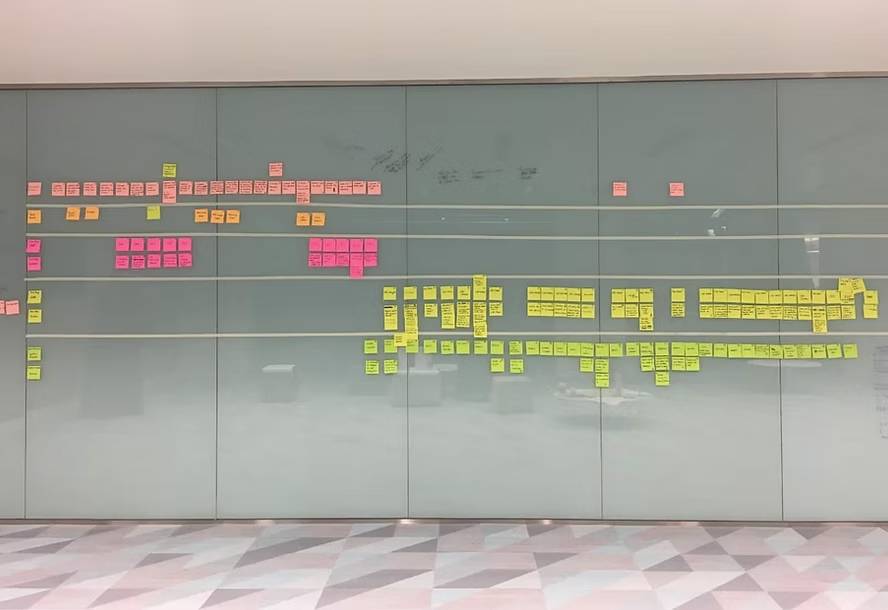
Assumptions validated
🔹Manual validation of concerns is time-consuming and error-prone, leading to delays in task assignment.
📝Validated: Confirmed by users who report repetitive steps and lack of automation slowing down daily operations.
🔹Operators prioritize concerns manually, leading to inconsistencies and inefficiencies in resolving urgent issues.
📝Validated: Users shared that prioritization often depends on intuition or external calls, with no standardized rules.
🔹Route optimization based on current data (e.g., truck location, traffic) is not being utilized effectively.
📝Validated: Operators adjust routes manually based on calls from drivers, not dynamic system inputs like traffic or fill levels.
🔹Real-time IoT data (bin fill levels, vehicle status) can significantly improve decision-making and operational efficiency.
📝Validated: Strongly supported by users who see value in real-time bin levels, especially in high-density zones.
🔹Fleet operators are overwhelmed with managing a large volume of concerns, leading to burnout and decreased productivity.
📝Validated: Operators expressed stress from duplicate or vague complaints, confirming mental overload.
🔹Automated concern categorization and prioritization can reduce manual effort and improve response time.
📝Partially Valid: Some operators distrust automated decisions or prefer manual overrides, especially for sensitive or VIP zones.
🔹Operators have visibility into all escalated concerns.
📝Invalid: Assumed true, but interviews revealed they often miss escalations unless directly notified or manually tracked, indicating a major blind spot.
🔹Citizen satisfaction will increase as a result of more reliable and timely waste collection services.
📝Validated: Backed by feedback from municipal reports — complaints drop significantly when issues are resolved within SLA windows.
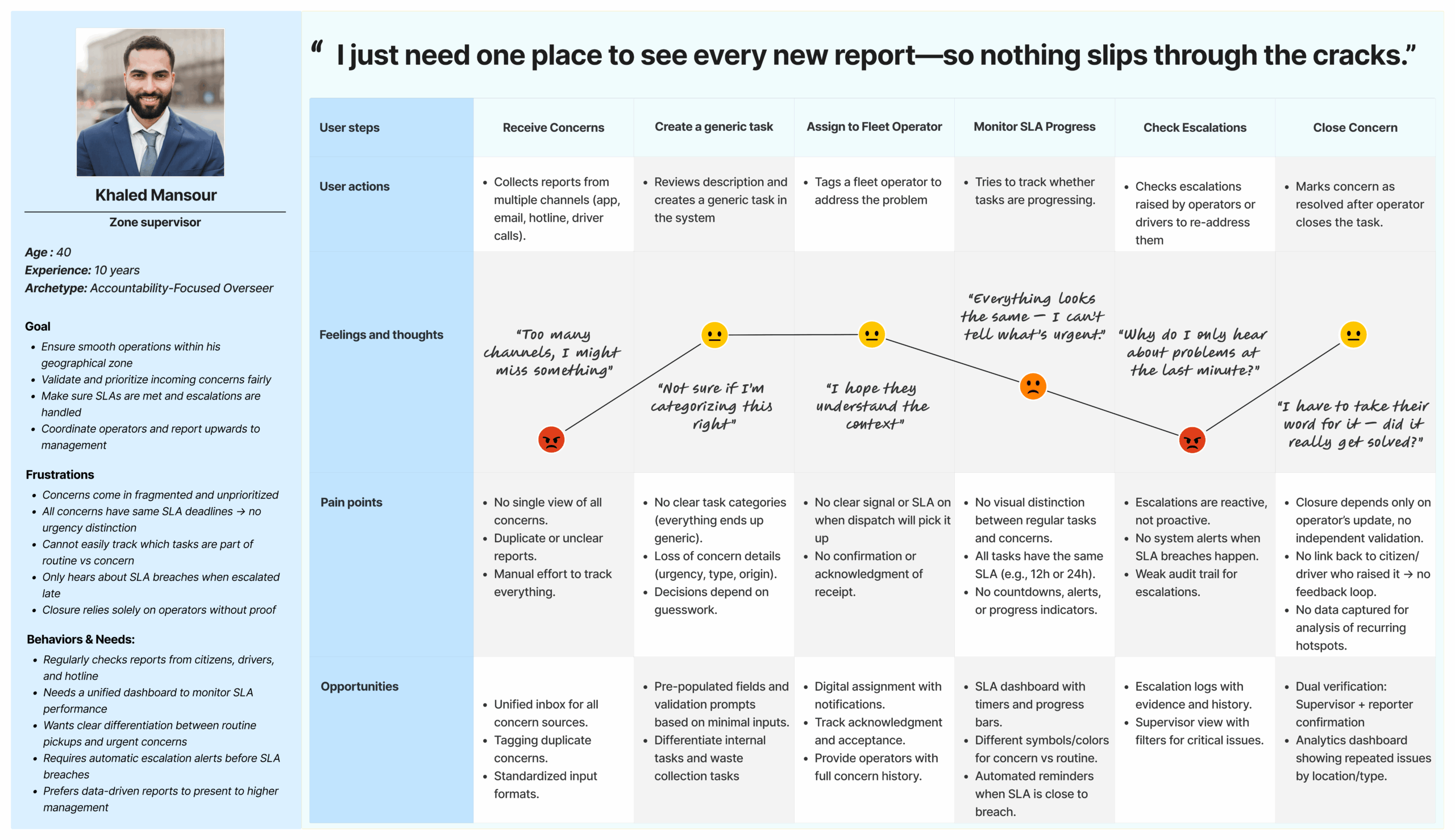
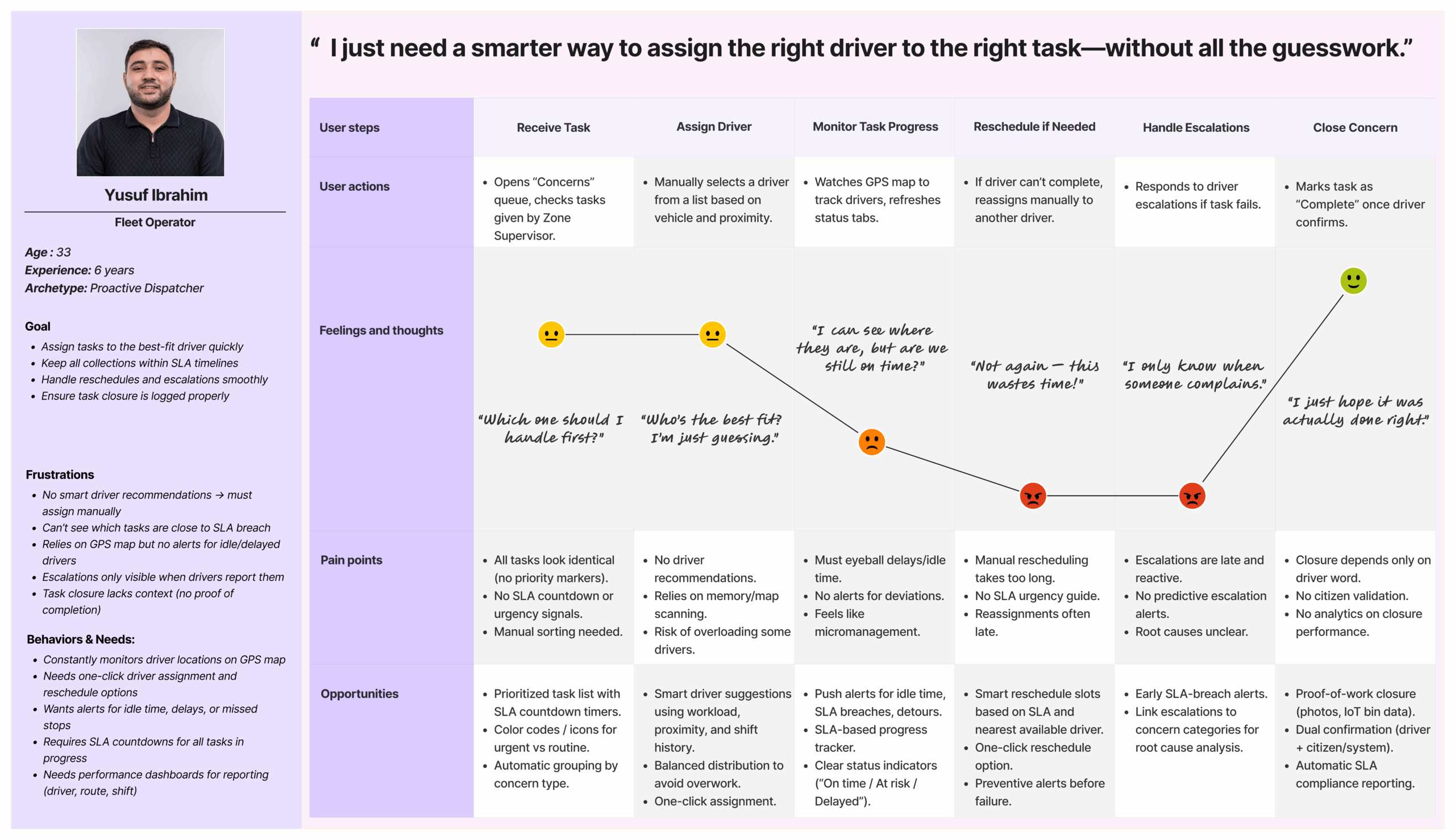
User Persona & User Journey map
Having spoken with operators, supervisors, and support staff, I distilled their goals, frustrations, and workflows into distinct personas. These fictional yet research-grounded characters anchor our design decisions, ensuring we solve the real problems of our most critical user segments rather than chasing abstract features.
Strategy
Goal Statement
The Concern management system lets fleet operators & zone supervisors optimize collection routes, prioritize tasks, and resolve issues in real-time. This improves their efficiency, reduces delays, and minimizes operational frustrations. The system’s effectiveness is measured by on-time collection rates, route optimization, and overall user satisfaction.
How might we...
To define the problem, I am going to solve, I create Point-of-View (POV) Statements that allow me to ideate in a goal-oriented manner, and How-Might-We (HMW) Questions to frame the ideation in the brainstorm session for solutions.
Point of view (POV)
💠Supervisors must manually sift through scattered inputs (app notifications, emails, calls), verify location and urgency, then create generic “tasks”—a process that’s overwhelming and delays when crews can go on-ground.
💠Because each concern is flattened into a task, critical context (original source details, urgency cues) is lost, and there are no real-time alerts for driver delays or SLA breaches—so operators feel constantly stressed and under pressure.
💠Without rule-based triage or driver-recommendation logic, operators must guess priority and pick drivers by memory/intuition, leading to suboptimal routes, longer resolution times, and growing citizen complaints.
💠Repeated manual steps—validate, create, assign, monitor, reschedule—eat up bandwidth. Operators want to cut out that busywork so they can focus on higher-value decision-making and generate accurate, timely analytics on resolution performance.
How Might We (HMW)
✳️HMW streamline and standardize concern intake so that operators can capture, verify, and turn reports into tasks in one unified flow with minimal clicks?
✳️HMW preserve the original concern’s details (source, urgency cues, attachments) and pair them with real-time driver status so operators always see “what happened” and “where things stand” in one view?
✳️HMW embed rule-based triage and driver-recommendation logic that suggests the right priority and best driver assignment based on location, workload, and SLA targets?
✳️HMW automate repetitive steps (validation reminders, reschedule suggestions, SLA alerts) and auto-generate performance analytics so operators can focus on decision-making rather than busywork?
To-be User Journey Map

Design
User Flow
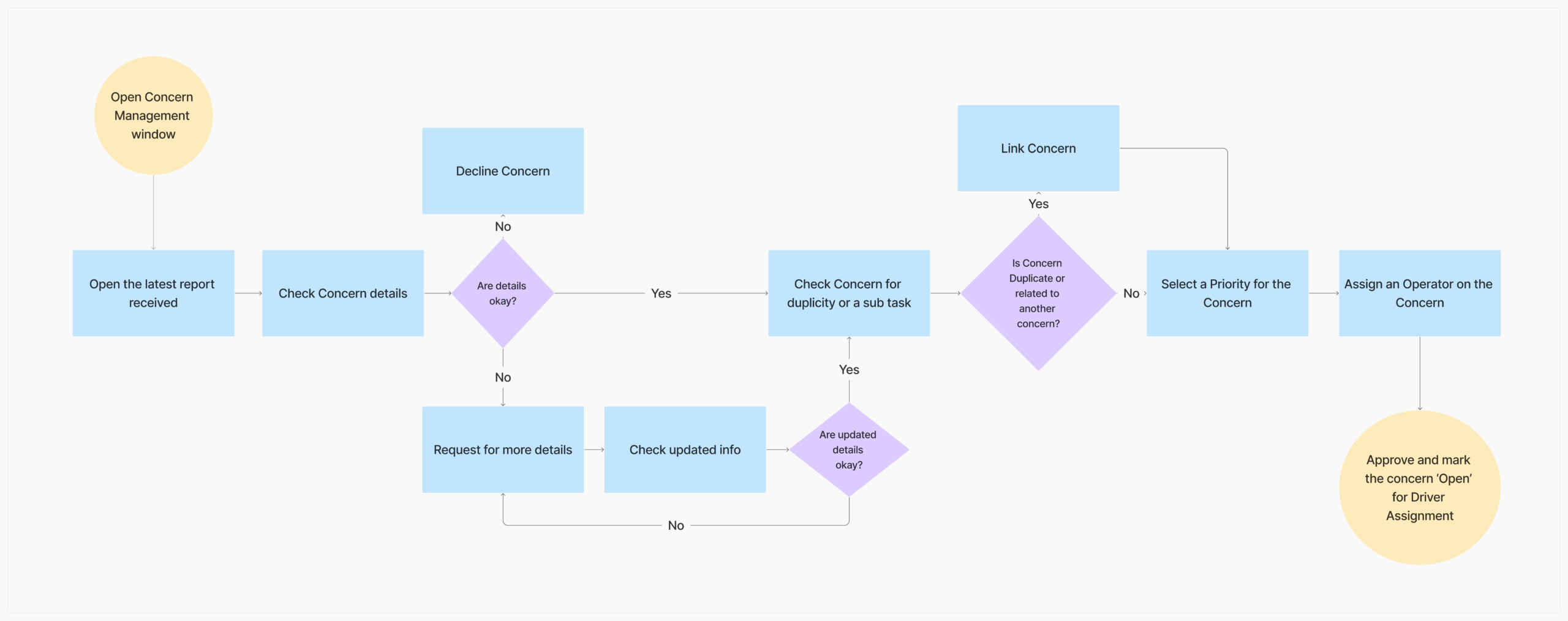
Building on the redesigned task flow, I mapped out detailed user flows that correspond to each key scenario identified in the workflow. These flows helped visualize how users would navigate the system to accomplish their tasks, ensuring alignment with real-world behaviors. To deepen this understanding, I incorporated decision trees to explore how users might respond emotionally and behaviorally at different points—enabling me to anticipate their actions, frustrations, or choices when interacting with the platform. This approach ensured a more empathetic and intuitive user experience design.
User Flow 1: Prioritize, Assign and Approve Concern
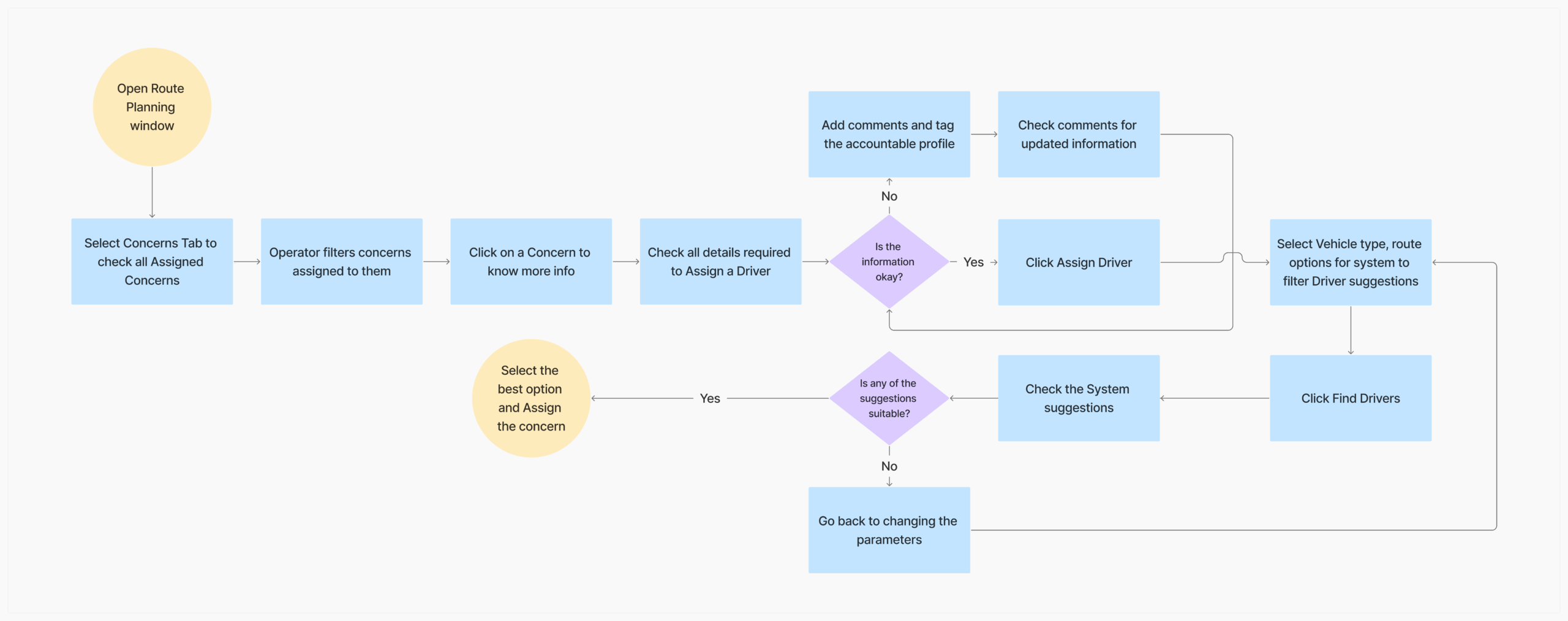
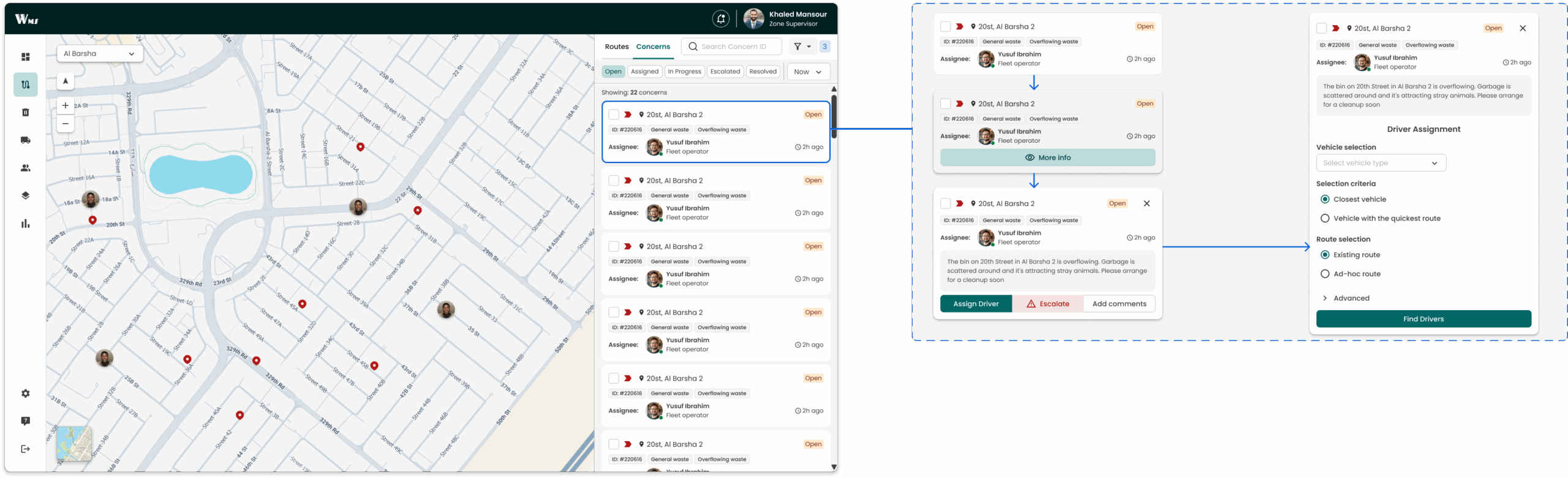
User Flow 2: Assign a Driver
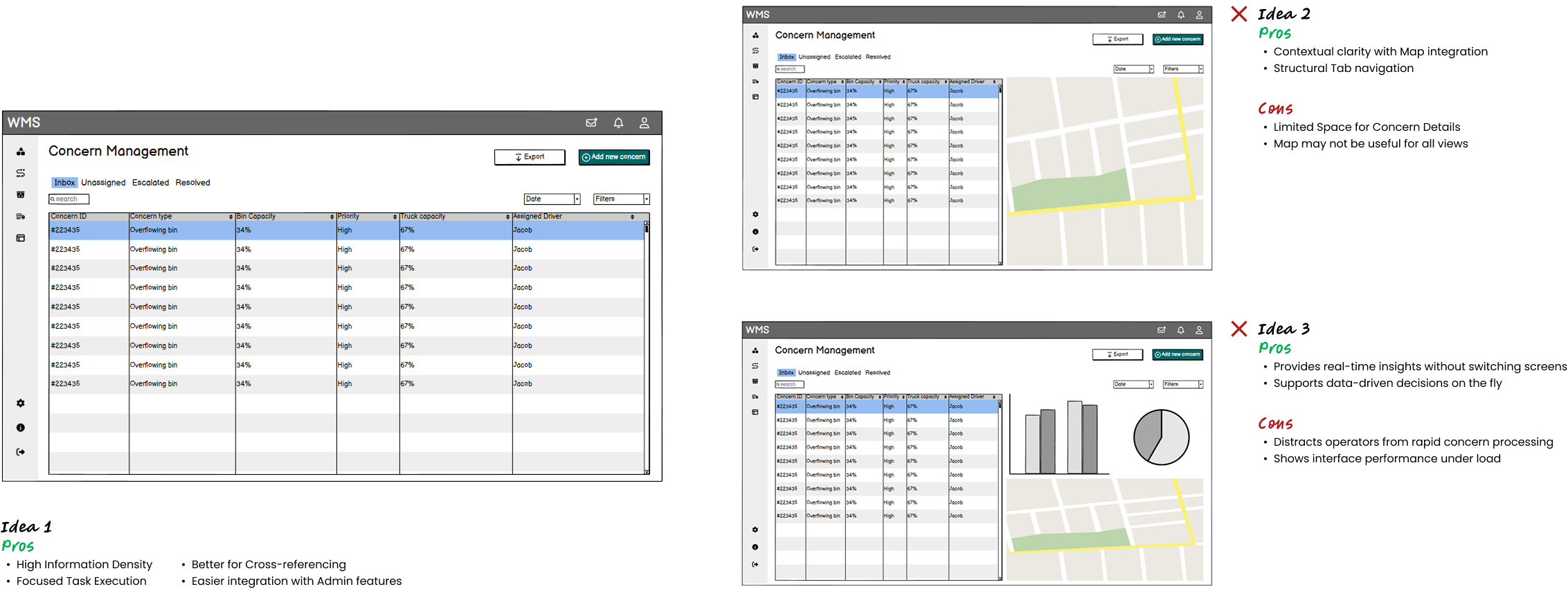
I Explored Multiple Layouts—But Only One Made Decisions Effortless
Wireframe
After creating an UI Requirement Document with a to-do list for designing the key screens identified in the task flow and user flow, I started sketching low-fidelity pages. I can capture my ideas by pen and paper quickly by sketching. It also enables me to examine my ideas before putting everything in the daunting process of digitizing.
Prototype & Test
The first prototype was technically right... but something still felt off
It was clear: efficiency wasn’t the problem anymore—context was. This insight led to a major shift in strategy.
User testing
I conducted user testing with 3 zone supervisors and 2 fleet operators, and created transcripts for each participant based on my observation of their interaction with the prototype. I jot down their mistakes, slips, and confusions they expressed in the process.
What didn't work:
⚠️ Insufficient Location & Context
All 5 operators (100%) struggled to judge urgency based on zone names alone—many had to switch to external maps to confirm exact addresses.
⚠️ Limited Workflow Context
Most operators (80%) noted they couldn’t tell what stage a concern was in—whether it was still awaiting validation, assignment, or already being addressed—leading to confusion and delays in prioritization.
⚠️ Missing Priority Signals
3 out of 5 participants (60%) said they couldn’t gauge the urgency of a concern from the list view alone—there were no clear indicators like SLA countdowns or severity tags, which made it harder to decide what needed immediate attention.
⚠️Poor Filtering & Navigation
4 out of 5 participants (80%) struggled with scanning large lists—filters were generic and tabs didn’t segment concerns by team forcing manual searching.
What did work:
✅ Bulk Actions & Sorting
4 of 5 zone supervisors (80%) used “select all” + “Mark Resolved/Priority” to cut their workflow time in half when handling large batches.
✅ Minimalist, Uncluttered Layout
100% of participants reported that the clean, no‑frills table—free of extra graphics—made it easier to focus on data entry and reduced mis clicks during peak hours.
.
From Feedback to Fixes: Bridging the Context Gap
How real-world user sessions revealed what the interface lacked—and how I addressed it with focused enhancements.
User Testing & Feedback
While running sessions with 3 concern‐logging operators and 2 fleet operators, I watched them struggle in real time: they would pause on a row to open multiple windows just to see where a bin was, why it was high‐priority, or if it had been reported before. Their comments—“I wish I could see exactly where this is on the map without clicking in” or “I don’t know why this one is marked high priority”—made it clear that context was missing.
.
Heuristic & Domain Alignment
After testing, I found operators were confused by unclear labels and workflows when linking concerns. I resolved this by applying heuristics (clearer wording, better feedback, consistent design) and domain alignment (using familiar terms and reflecting real escalation flows). This made the process more intuitive and closer to their real work practices.
.
Updates to Prototype
But did it work this time?
Yes it did!
And how it brought impact
✅ Concern Symbol Differentiation
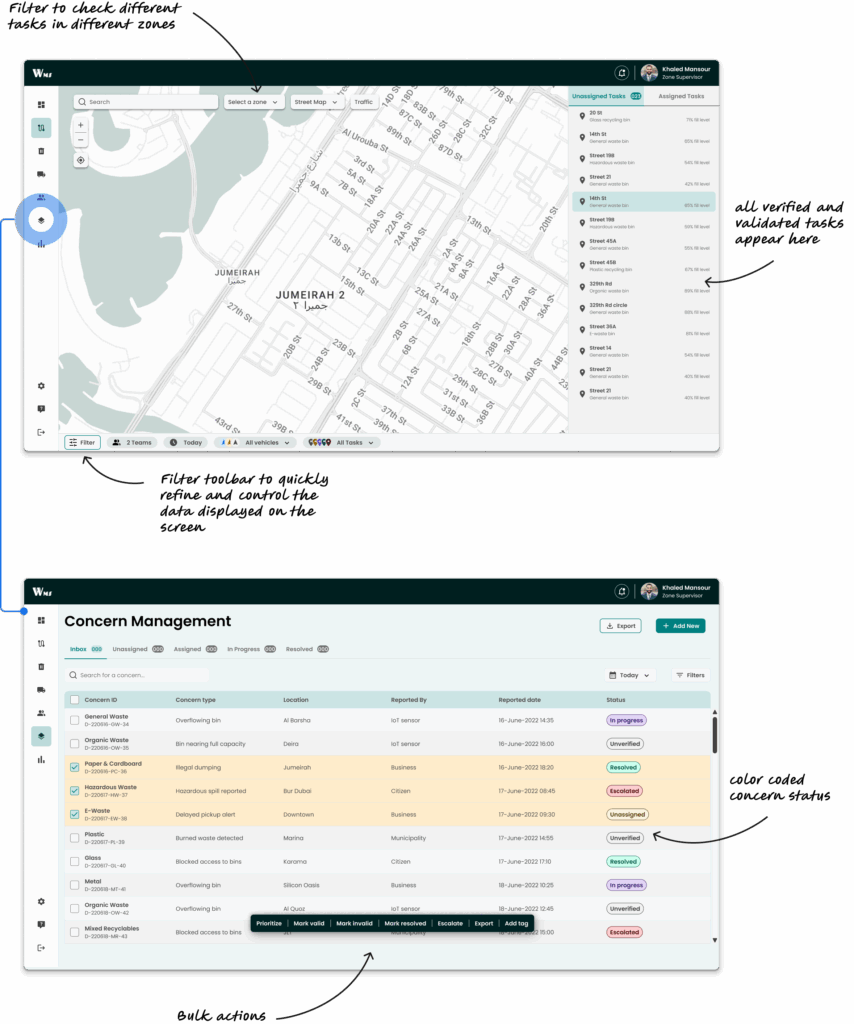
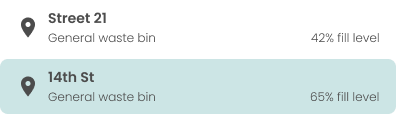
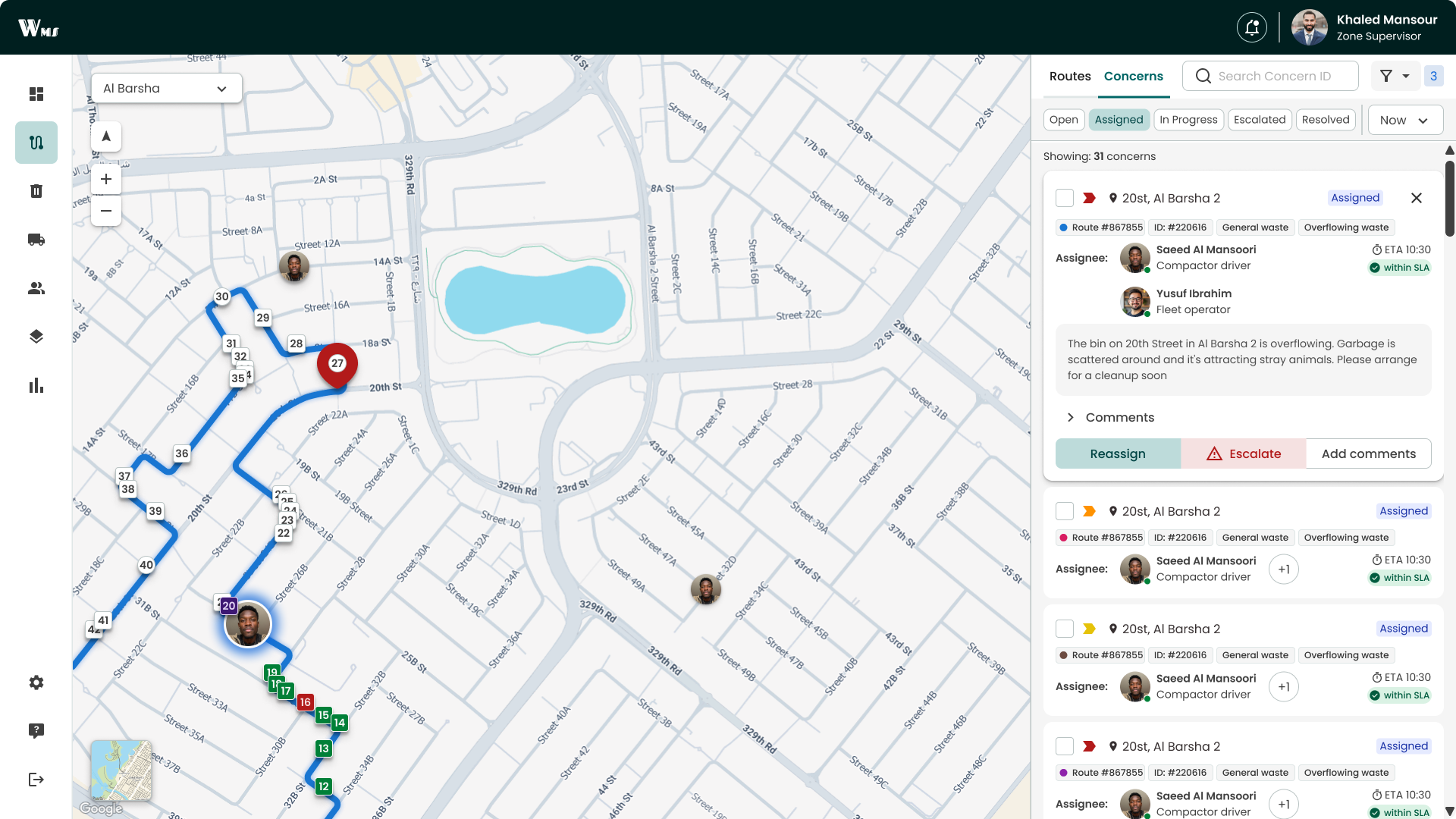
Operators viewing routes saw concerns marked with a circle icon, distinct from the square icons for regular pickups. This clear visual cue helped them immediately spot and prioritize concern-related stops without confusion.
✅Hover Map Preview
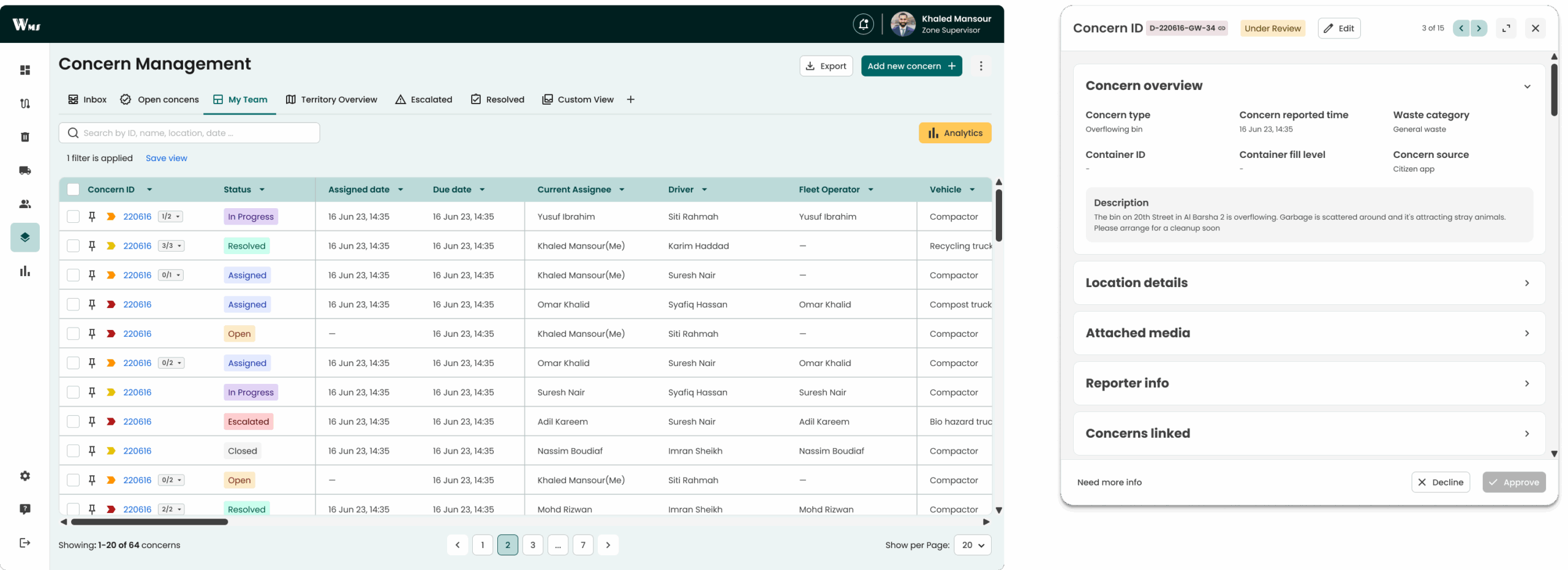
When users hovered over a Location cell, a mini map popped up showing the exact bin pin and surrounding streets—so they could confirm spatial context without leaving the table.
✅Configurable Concern Views
Instead of a static table, I introduced default tabs (Inbox, My Team, Escalated, Resolved, etc.) that let operators quickly switch between perspectives. They can also add Custom Views to track parameters most relevant to their workflow, making comparison and monitoring more flexible.
✅Quick Action Buttons
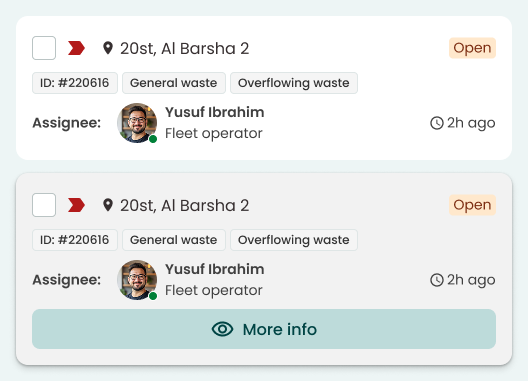
Inline “Assign,” and “Escalate” buttons appeared on each card upon hover, enabling one-click task updates (e.g., escalating or assigning a concern) directly from the list view.
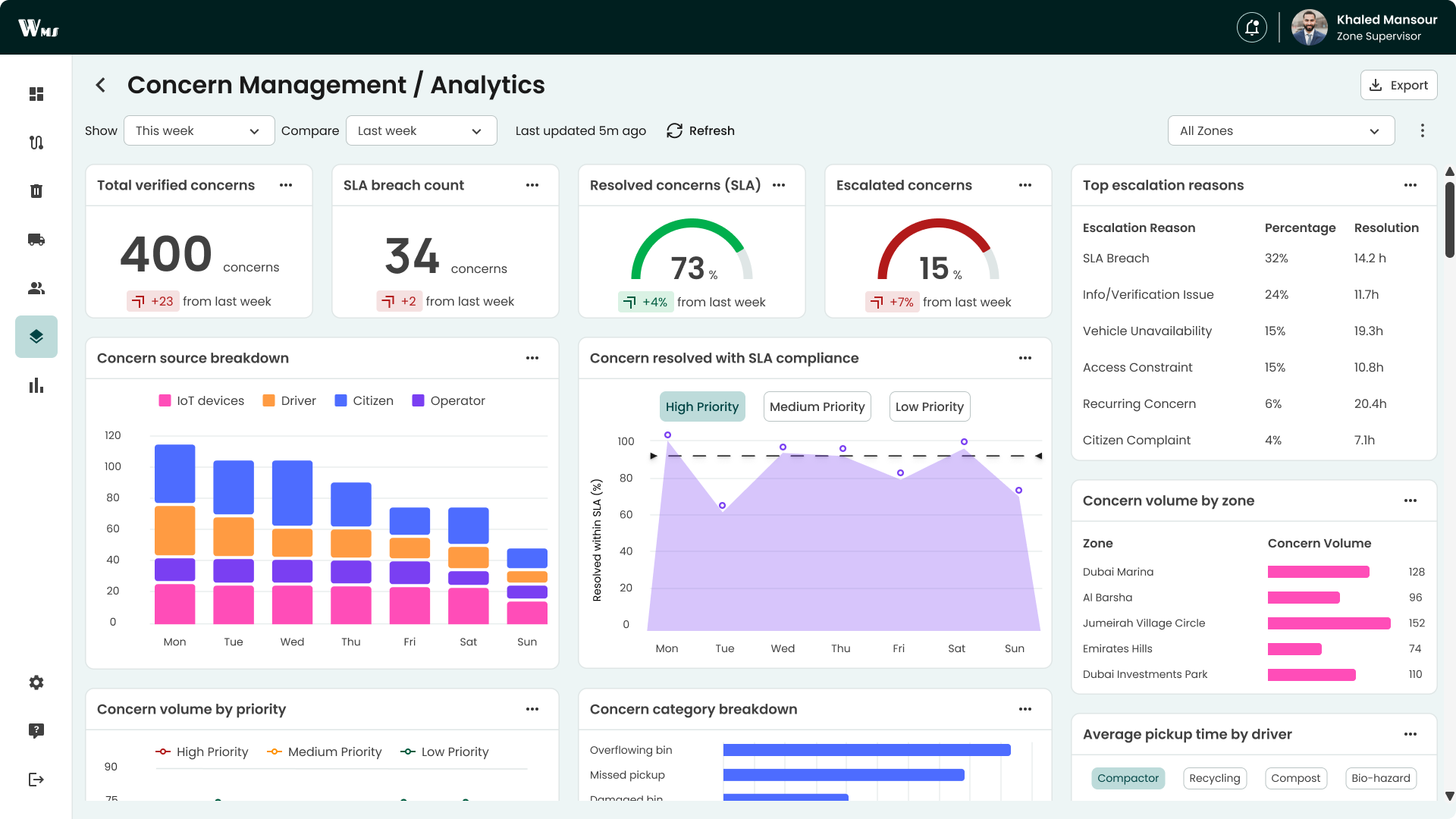
✅Dedicated Analytics Tab
A new “Analytics” section within the concern module displayed real-time metrics such as daily concern volume, SLA compliance, and concern source breakdown, all without navigating away from the concern page.
🎯Higher On-Time Collection Rates
By introducing clear priority indicators and quick-glance status badges, operators were able to identify and act on urgent concerns faster—resulting in an increase in on-time pickups across high-priority tasks.
On-time collection rate increased from 67% to 93% over a period of 5 months
🎯Improved Route Optimization
20–30% reduction in average route time
Before system optimization:
Avg. route time: 3.5–4 hours
After optimization with clustering, prioritization, and real-time reassignment:
Avg. route time drops to 2.5–3 hours
🎯Enhanced User Satisfaction
Quick action buttons and the concern history badge eliminated manual guesswork and extra clicks, leading to a increase from 55% to 75% CES score in operator frustrations in post-shift surveys.
🎯Real-Time Visibility & Decision Confidence
The dedicated analytics tab gave supervisors immediate insight into daily volumes, SLA compliance, and hotspot trends—enabling faster resource reallocation and higher confidence in operational decisions.
Lessons that go beyond this project
🎯User Testing and Iteration at Every Stage
Continuously tested with managers and operators, gathering feedback to identify blind spots, refine features, and pivot from efficiency-focused solutions to context-driven improvements.
🎯 Solving Complexity with Structure
Transformed a previously disjointed, inefficient system into a structured, strategic workflow by prioritizing IA, meticulously mapped journeys, and real-time performance tracking.
🎯 Cross-Functional Collaboration
Worked closely with manager, developers and data analyst to align business goals, user needs, and design consistency, ensuring the system worked seamlessly across different roles.
🎯 Designing for Efficiency and Context
Learned how to balance efficiency with contextual relevance by integrating real-time insights, adaptive workflows, and data visualization to design a system that was both fast and context-aware.